
Download Checkvist – Keyboard‑Centric Task Management Tool for Developers, Writers & Teams
Overview
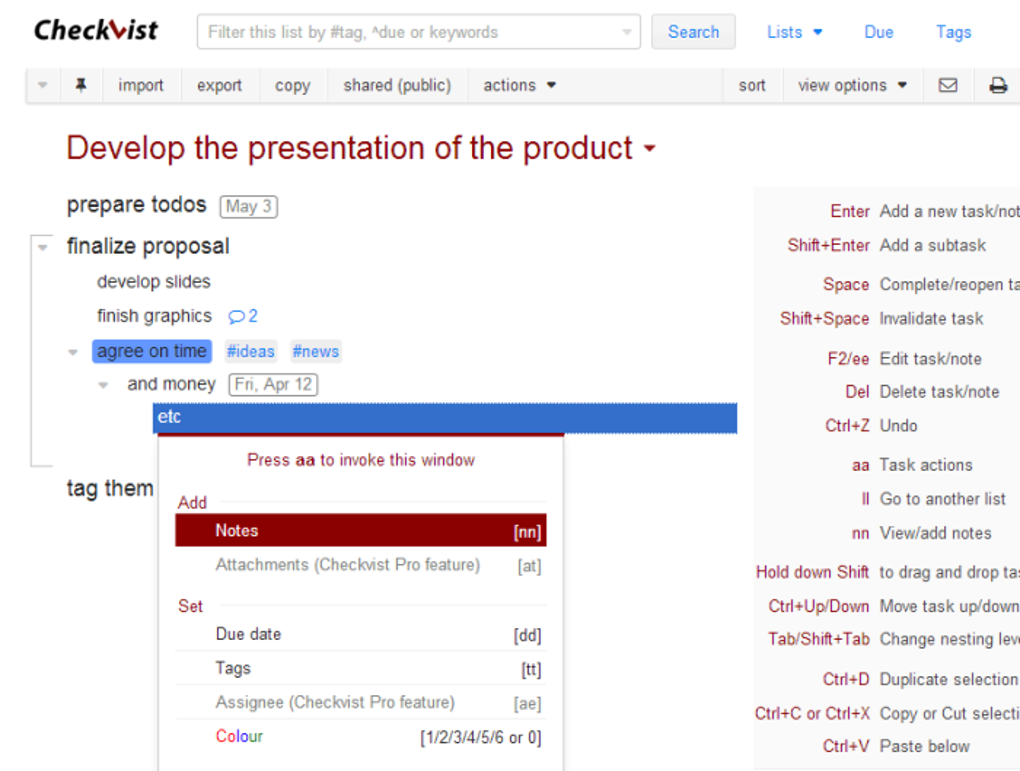
Checkvist is a web‑based task manager that takes a bold, keyboard‑first approach to organizing work. Unlike conventional to‑do apps that rely heavily on mouse clicks and drag‑and‑drop, Checkvist lets you create, edit, and navigate complex lists using intuitive shortcuts. The platform supports unlimited nested sub‑tasks, markdown formatting, code snippets, and real‑time collaboration, making it a perfect fit for developers, technical writers, and anyone who prefers to think while typing.
With a clean, distraction‑free interface, you can quickly add tasks, assign due dates, attach files, and share lists with teammates. A free tier provides essential functionality, while the paid plan unlocks advanced features such as file attachments, custom filters, and priority tagging. Whether you’re planning a software release, drafting a research paper, or simply need a powerful outline tool, Checkvist delivers a robust, secure, and highly customizable environment that scales from personal errands to enterprise‑level projects.
Features & Benefits
- Keyboard‑Centric Workflow: Over 150 shortcuts let you create, move, and edit items without leaving the keyboard.
- Unlimited Nested Sub‑Tasks: Build deep hierarchies for complex projects, keeping every detail within reach.
- Markdown & Code Support: Format text, embed code blocks, and use inline styling directly in tasks.
- Real‑Time Collaboration: Share lists with teammates, watch live updates, and comment on individual items.
- Due Dates & Reminders: Assign deadlines, set recurring reminders, and track progress with visual indicators.
- File Attachments: Upload documents, images, or scripts (available in the premium plan).
- Export Options: Download lists as plain text, CSV, JSON, or PDF for offline archiving.
- Cross‑Platform Access: Use any modern browser on Windows, macOS, Linux, Android, or iOS.
- Secure Data Handling: All data is transmitted over HTTPS and stored with encrypted backups.
Pros
- Lightning‑fast keyboard navigation reduces mouse fatigue.
- Deep nesting supports highly structured project plans.
- Markdown integration appeals to technical users.
- Collaborative editing works in real time without page reloads.
- Free tier is generous enough for individual power users.
Cons
- Steep learning curve for users unfamiliar with shortcuts.
- No native desktop app; relies on browser performance.
- Premium features (file attachments, custom filters) require a paid subscription.
- Lacks built‑in Gantt chart or Kanban board visualizations.
- Mobile experience is functional but not as fluid as desktop.
Overall Rating: 4.5/5 – Checkvist shines for users who live on the keyboard, offering unparalleled speed and flexibility for complex task structures.
Installation & Compatibility
Because Checkvist is a cloud‑based web application, there is no traditional installation process. Getting started is as simple as visiting checkvist.com, creating a free account, and beginning to build your first list. The platform works flawlessly in the latest versions of Chrome, Firefox, Safari, and Edge. For users who prefer a desktop‑like experience, you can create a progressive web app (PWA) shortcut on Windows, macOS, or Linux: simply open the site, click the browser’s “Install” or “Add to Home Screen” option, and you’ll have a dedicated app window that runs offline for previously loaded lists.
Supported Operating Systems: Windows 10/11, macOS Monterey and later, Linux distributions with a modern browser, Android 8.0+, iOS 13+. The responsive design adapts to tablets and smartphones, ensuring you can capture ideas on the go.
Step‑by‑Step Usage Guide
- Sign Up: Click “Sign Up” on the homepage, enter your email, and confirm the verification link.
- Create a List: Press Ctrl + N (or ⌘ + N on macOS) to open a new list, then type your first task and press Enter.
- Add Sub‑Tasks: Select a task and hit Tab to indent, creating a child item. Use Shift + Tab to outdent.
- Apply Markdown: Enclose text with ** for bold, _ for italics, or backticks for code. The preview updates instantly.
- Share & Collaborate: Click the “Share” button, copy the invitation link, and assign edit or view permissions.
- Set Due Dates: With a task selected, press D to open the date picker, choose a date, and add a reminder if needed.
- Export Your Work: Use the “Export” menu to download the list in CSV, JSON, or PDF format for offline archiving.
Regular updates are rolled out automatically, so you always have the latest shortcuts, security patches, and feature enhancements without manual downloads. If you decide to upgrade to the premium plan, the billing is handled securely through Stripe, and you’ll instantly gain access to file attachments, custom filters, and priority tagging.
Frequently Asked Questions & Final Thoughts
Is Checkvist truly free or do I need to pay for essential features?
Checkvist offers a robust free tier that includes unlimited lists, nested tasks, markdown support, and basic collaboration. Premium features such as file attachments, custom filters, and priority tags require a paid subscription, but most individual power users find the free plan sufficient for daily workflow.
Can I use Checkvist offline?
Yes. By installing Checkvist as a Progressive Web App (PWA), you can access previously loaded lists offline. Any changes made while offline sync automatically once you reconnect to the internet.
How secure is my data on Checkvist?
All communications are encrypted with HTTPS, and data is stored on servers that use regular encrypted backups. Premium accounts also benefit from two‑factor authentication for added protection.
Does Checkvist integrate with other productivity tools?
Checkvist provides export options (CSV, JSON, PDF) that can be imported into tools like Trello, Asana, or Excel. Additionally, its API allows developers to build custom integrations with services such as Zapier or GitHub.
What kind of support does Checkvist offer?
Free users have access to a comprehensive knowledge base, community forum, and email support. Premium subscribers receive priority email response and direct access to the development team for feature requests.
Conclusion – Should You Download Checkvist?
If you spend most of your day typing code, notes, or structured outlines, Checkvist can dramatically speed up your workflow. Its keyboard‑first design eliminates the friction of mouse‑driven task managers, while the deep nesting and markdown capabilities keep complex projects tidy and readable. The free tier is generous enough for solo freelancers, and the paid plan scales well for small teams that need file attachments and advanced filtering. Although there’s a learning curve, the payoff is a fluid, distraction‑free environment that lets you focus on the work rather than the tool. Ready to boost your productivity? Click the button below to create your free account, explore the shortcut guide, and experience a truly keyboard‑centric task manager.



.png)



